Posts

Showing posts with the label C#

ItemsControlMouseDragElementBehavior

This is a Behavior I created to allow Drag and reposition items in WPF Control that extend ItemsControl. After applying this behavior the user can at runtime click and drag any item while holding the control key. I created this behavior to support a application which required ability for the users to reposition items like icons on a desktop. Here is the screen cast of the sample application demonstrating this.


Selective Debugging for WPF Binding

  Have you ever pulled out your hair trying to figure out why / why not a particular value is (or not) being set on your control , what was wrong with the binding? I have seen people suggest exotic solutions where in there used a special converter so that they can debug the value being bound, or turn-on WPF tracing which generates a huge volume of trace statements that you will have to filter, well i found a easier way to debug just the one binding that matters by specifying a  binding attribute. 1: < UserControl 2: xmlns:diag ="clr-namespace:System.Diagnostics;assembly=WindowsBase" > 3: ... 4: ... 5: < Grid > 6: < TextBlock VerticalAlignment ="Center" Text ="{Binding Name,diag:PresentationTraceSources.TraceLevel=High}" /> 7: </ Grid >   this produces following output in your trace log 1: System.Windows.Data Warning: 54 : Path: 'Name'...

Sliverlight Application Framework

Here is the screen cast of demo which was built on top of the sliverlight application framework that I was working on for sapient labs. we will be hosting this application on the cloud (azure) shortly… Part 1 Part 2

Expression Blend 3 Preview

Image
Looks like VS 2010 editor and the blend editor have some code base.. I was pleasantly surprised to see C# intellisense in blend, I was only expecting XAML intellisense.  

C# 3.0 for Linux

This is awesome Mono implements the complete C# 3.0 spec with full support for LINQ Add to that have a Parallel LINQ bits too...

ShaderPad - WPF ShaderEffect's Workbench

Image
ShaderPad is a application like XamlPad / LinqPad , it is meant to server as WPF ShaderEffect Workbench. The ShaderEffect is a PixelShader based Effect that an be applied to any UIElement in WPF. This feature is available only in WPF 3.5 SP1 This release also includes the ability to animate the input variables that are passed to the ShaderEffect. This is a quick and dirty release :) , so expect some instability... In next release will add the ability to load effects from a common location on web, and save to web, this allow people to more freely share their effects. Pre Requisites .NET 3.5 SP1 : Download . Direct X SDK : Download June 2008 . Download the Releases and source code at CodePlex . Lookout for Effects releases soon.... Update: Example Blending Effects here

Wave Reflection Effect New Video

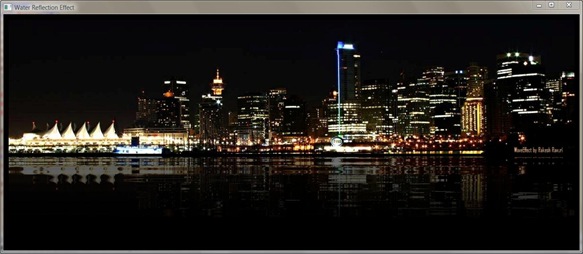
Added a new video to shows that this effect is not just a image effect . Original Post

Wave Reflection Shader Effect in WPF

Image
WPF 3.5 SP1 (Beta) introduces the ability to apply Pixel Shader effects to any UIElement, these will executed by GPU by compatible cards. Greg Schechter's blog is an excellent place to start learning about these features. Shader Effects have long been used in rendering pipeline, to create great special effects. And nowadays are used by almost every game engine to enhance the visual aspects of the game play. Another good tutorial and Check out the HLSLTester code , it is helpful in creating new effects here . I have used the Shader code from this page and added some dynamic properties to create the following effect. Download the full code for this demo from here . Download the compiled effect .

Future of C# & C# 4.0

Image
Good discussion on Channel 9 on the future of C# and some rational behind features that might make it in C# 4.0 .( We'll see what those features are at PDC ) "Concurrency features by far are game changing aspects.." - Andres C# 4.0: Meet the Design Team